
VCPAgency
Secure Law Enforcement & Prosecutor Portal for Crime Documentation Submission
Law Enforcement PortalContents
1. Overview
VCPAgency is a purpose-built portal within the VCPMS platform designed for law enforcement agencies, prosecutors, and related government entities. It provides a secure, audited interface for submitting crime-related documentation—police reports, evidence records, investigation findings, and verification forms—directly into the victim compensation claims management system.
By digitizing and streamlining the flow of law enforcement documentation, VCPAgency eliminates paper-based submission bottlenecks, accelerates claims processing timelines, and ensures that sensitive crime records are handled with the highest level of security and compliance.
Who Uses VCPAgency?
Law Enforcement Officers
Police officers, sheriff deputies, CHP officers, and federal agents who submit police reports and crime documentation to support victim compensation claims.
Prosecutors & Staff
District attorneys, prosecutors, and their staff who provide court records, case information, and investigation findings relevant to claims adjudication.
Government Agency Personnel
Crime laboratory technicians, court clerks, Child Protective Services workers, and Department of Social Services staff who contribute supporting documentation.
Screenshot: VCPAgency Dashboard — Law enforcement landing page with submission status overview and pending tasks — Available in production environment
2. Getting Started
Getting started with VCPAgency is straightforward. Agency personnel register through a secure process managed by back-office administrators, ensuring that only authorized law enforcement and government staff gain access to the portal.
Account Registration
Request Access
Contact the victim compensation program office or visit the VCPAgency registration page to request an account. Provide your agency affiliation, role, and official email address.
Email Verification
You will receive a verification email at your registered address. Click the verification link to confirm your identity and activate your account.
Set Up Authentication
Create a secure password (minimum 12 characters with complexity requirements) and configure multi-factor authentication (MFA) for enhanced security.
Begin Submitting Documents
Once verified, log in to the portal dashboard to begin submitting police reports, crime documentation, and verification forms in support of victim claims.
Single Sign-On (SSO) Integration
VCPAgency supports integration with your organization's existing identity provider through industry-standard SSO protocols (SAML/OAuth). When SSO is configured, agency personnel can log in using their existing organizational credentials, eliminating the need for separate passwords and simplifying access management.
Screenshot: VCPAgency Login Page — Secure login with SSO option and multi-factor authentication prompt — Available in production environment
Authentication Security
| Security Feature | Details |
|---|---|
| Password Policy | Minimum 12 characters with complexity requirements |
| Multi-Factor Authentication | Required for all users (when enabled by administrator) |
| Password Rotation | Every 90 days; cannot reuse last 4–5 passwords |
| Session Management | Automatic timeout controls for inactive sessions |
| Connection Encryption | TLS 1.2+ encrypted connections on all portal access |
3. Document Submission
The core function of VCPAgency is enabling law enforcement and government agencies to submit crime-related documentation electronically. Every document submitted flows directly into the claims management system and is immediately visible to back-office staff, dramatically reducing processing delays.
Supported Document Types
Police Reports
Official incident reports from police departments, CHP, sheriff offices, DOJ, and FBI. Includes narrative reports, supplemental reports, and follow-up documentation.
Investigation Records
Investigation findings, evidence records, crime scene documentation, and forensic analysis results that support claim verification and adjudication.
Court Records
Court case information, prosecution records, sentencing documents, and other judicial records relevant to victim compensation claims.
Protective Services Reports
Child Protective Services (CPS) reports and Department of Social Services documentation for cases involving minors or vulnerable adults.
Verification Forms
Law enforcement verification forms confirming crime occurrence, victim status, cooperation with investigation, and other claim eligibility criteria.
Lab & Forensic Documentation
Crime laboratory results, forensic analysis reports, and Sexual Assault Kit (SAKI) tracking documentation where applicable.
Submission Workflow
How Document Submission Works
Initiate Submission
From your dashboard, select "New Document Submission" and choose the document type (police report, investigation record, court record, etc.).
Upload & Classify
Upload one or more files and provide reference information such as the associated claim number, victim name, incident date, or case reference.
Review & Submit
Review the submission details for accuracy and submit. The documents are immediately transmitted to the claims management system.
Track Processing
Monitor the status of your submission from the dashboard. You will receive notifications when documents are reviewed or when additional information is requested.
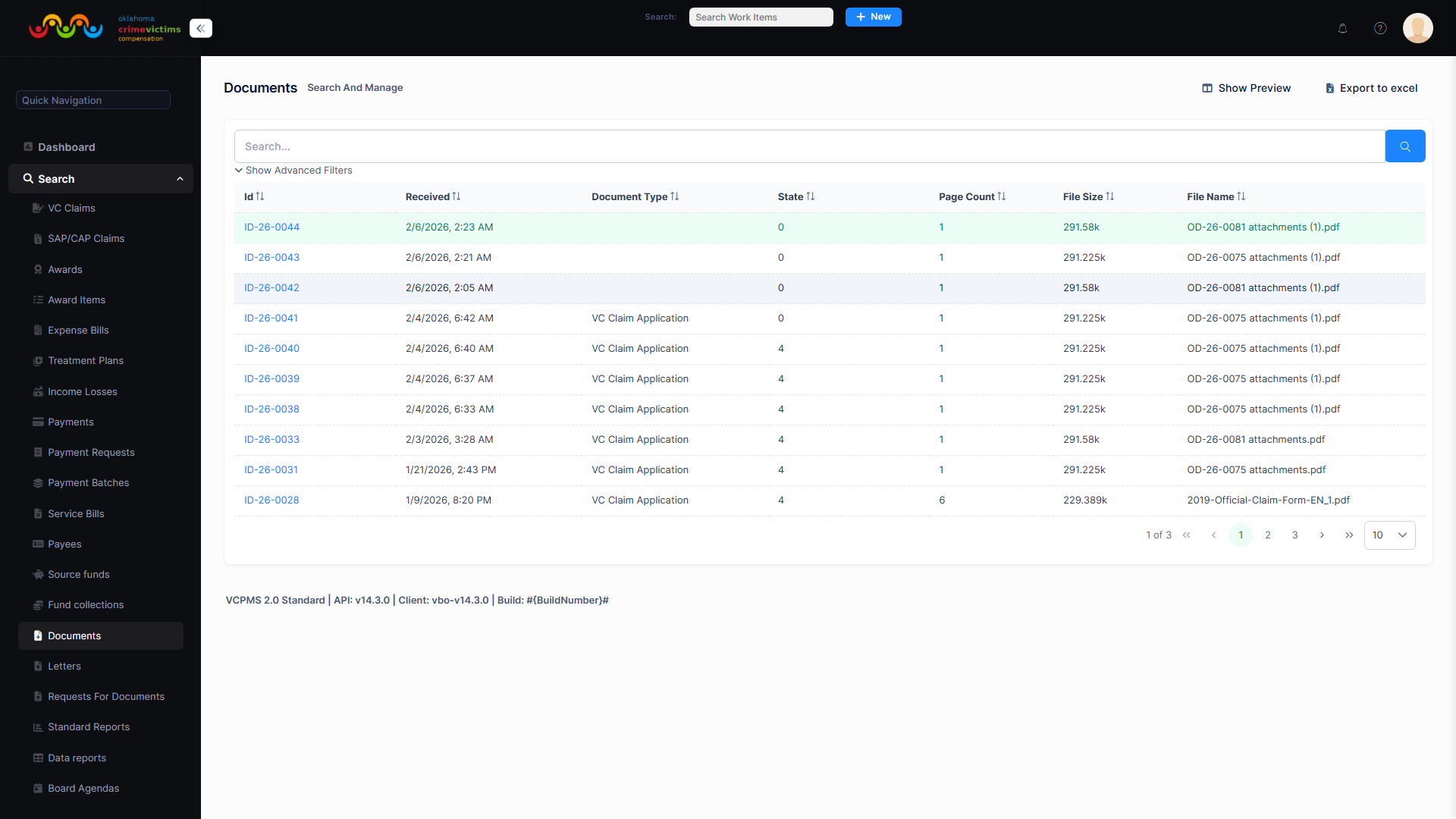
Document management interface — Back-office view of document search, upload, and classification tools
Submission Tracking
Every document submission is tracked from the moment it enters the system. From your VCPAgency dashboard, you can view the real-time processing status of all your submissions, see when documents have been reviewed, and receive alerts if additional information or clarification is needed by claims staff.
Screenshot: Submission Tracking View — List of submitted documents with status indicators (Received, Under Review, Processed, Action Needed) — Available in production environment
4. One-Time Access Codes
VCPAgency supports one-time access codes for situations where external parties—such as officers from neighboring jurisdictions, temporary staff, or specialized investigators—need to submit documentation without creating a permanent portal account.
How It Works
Code Generation
A back-office administrator or authorized agency user generates a one-time access code tied to a specific claim or submission request.
Secure Distribution
The access code is securely delivered to the external party via email or other verified communication channel, along with instructions for use.
Limited Access
The recipient uses the code to access a restricted submission form. They can upload the requested documentation without viewing other claims or system data.
Automatic Expiration
Once used or after the expiration period, the access code is automatically invalidated. All actions taken with the code are logged in the audit trail.
Screenshot: One-Time Access Code Entry — Streamlined submission interface for external parties using a temporary access code — Available in production environment
5. Communication & Notifications
VCPAgency provides a secure, two-way communication channel between law enforcement personnel and victim compensation program staff. All correspondence is tracked, logged, and associated with the relevant claims for a complete audit trail.
Communication Capabilities
Two-Way Messaging
Exchange secure messages with back-office claims staff. Request additional information, respond to inquiries, and coordinate on documentation needs—all within the portal.
Automated Notifications
Receive real-time alerts when submissions are reviewed, when status changes occur, or when new communications arrive from program staff.
Flexible Delivery
Choose how you receive notifications: via email, SMS text message, or portal messages. Configure preferences to match your workflow and communication style.
Notification Types
| Notification | Trigger | Delivery Options |
|---|---|---|
| Submission Received | Document successfully uploaded and received by the system | Email, SMS, Portal |
| Document Reviewed | Back-office staff reviews or processes a submitted document | Email, SMS, Portal |
| Additional Info Needed | Staff requests clarification or supplemental documentation | Email, SMS, Portal |
| New Message | New correspondence received from program staff | Email, SMS, Portal |
| Status Change | Submission or associated claim status is updated | Email, Portal |
Screenshot: Notifications Center — Portal notification inbox showing recent alerts and correspondence history — Available in production environment
6. Profile Management
VCPAgency provides straightforward profile management tools so agency personnel can keep their contact information current and configure communication preferences to suit their workflow.
Profile Features
Contact Information
Update your name, email address, phone number, and agency affiliation. Ensure claims staff can always reach the right person for document follow-ups.
Communication Preferences
Choose your preferred notification channels (email, SMS, portal messages) and configure which types of alerts you wish to receive.
Security Settings
Manage your password, configure multi-factor authentication settings, and review your recent login activity for security monitoring.
Screenshot: Profile Management Page — Contact information form with communication preference toggles and security settings — Available in production environment
7. Security & Privacy
VCPAgency is engineered with the rigorous security standards required for handling law enforcement data. The portal enforces strict data isolation, role-based access controls, and comprehensive audit logging to ensure that sensitive crime documentation is protected at every stage.
Data Access Controls
Role-Based Access
Agency users see only claim-relevant information appropriate to their role. Internal staff notes, financial details, and administrative data are never exposed to external portal users.
Data Isolation
Multi-tenant architecture ensures complete data isolation between programs and jurisdictions. Cross-jurisdiction access is strictly controlled in multi-jurisdiction implementations.
Complete Audit Trail
Every action—login, document upload, message sent, profile change—is logged with timestamps and user identification for full accountability and compliance.
Compliance Standards
| Standard | Scope | Implementation |
|---|---|---|
| CJIS Alignment | Criminal Justice Information Services compliance | Security policies aligned with FBI CJIS requirements for law enforcement data handling |
| HIPAA Compliance | Health-related information protection | Full HIPAA safeguards for any medical or health-related documentation |
| TLS 1.2+ | Data in transit | All portal communications encrypted with TLS 1.2 or higher |
| AES-256 | Data at rest | All stored data and documents encrypted with AES-256 encryption |
| WCAG 2.1 AA | Accessibility | Portal interface meets web accessibility guidelines |
Law Enforcement Report Protections
Security Architecture
Screenshot: Security Architecture Diagram — End-to-end encryption and access control layers protecting law enforcement data — Available in production environment
8. Benefits of VCPAgency
Eliminate Paper Bottlenecks
Replace slow, manual paper-based submission processes with instant electronic document delivery. Reduce documentation turnaround from weeks to minutes.
Accelerate Claims Processing
Documents submitted through VCPAgency are immediately visible to back-office staff, removing the single largest bottleneck in victim compensation claims processing.
Secure & Compliant
Purpose-built for law enforcement data with CJIS-aligned security, AES-256 encryption, MFA, and comprehensive audit trails that meet the highest compliance standards.
No Software to Install
VCPAgency is a fully browser-based portal accessible from any desktop, tablet, or mobile device. No special software, plugins, or IT infrastructure changes required.
Real-Time Visibility
Track the status of every submission in real time. Know exactly when documents are received, reviewed, and processed—no more follow-up phone calls or emails.
Seamless Collaboration
Two-way communication with claims staff, one-time access codes for external parties, and configurable notifications keep all stakeholders connected and informed.
SSO Integration
Integrate with your agency's existing identity provider for seamless single sign-on access. Reduce credential fatigue and simplify user management for IT administrators.
Help Victims Faster
Every day of documentation delay is another day a crime victim waits for compensation. VCPAgency shortens that wait by making law enforcement's role in the process effortless.