
VCPAdvocate
Table of Contents
1. Overview
VCPAdvocate is a dedicated web portal designed for victim advocates who assist crime victims in navigating the compensation claims process. It provides authorized advocates with secure, real-time access to claim records, status tracking, and two-way communication with back-office staff — enabling advocates to act on behalf of victims, submit documents, monitor case progress, and coordinate seamlessly with the victim compensation program.
By bridging the gap between victims and the compensation office, VCPAdvocate reduces the burden on victims and supports trauma-informed service delivery by keeping them informed through trusted intermediaries.
Target Users
Victim Advocates
Staff at nonprofits, hospitals, and community organizations who guide victims through the claims process and provide ongoing support.
Legal Representatives
Attorneys and legal professionals authorized by victims to access and manage claim information on their behalf.
Court-Appointed Advocates
Individuals appointed by the court to represent victim interests, requiring verified access to case details and documentation.
Victim Navigators
Alaska-specific role combining victim advocacy with law enforcement liaison, enabling direct referrals and real-time assistance tracking.
Screenshot: VCPAdvocate portal landing page with advocate-specific navigation and assigned clients overview — Available in production environment
2. Getting Started
Getting started with VCPAdvocate is straightforward. The portal is designed for quick onboarding so advocates can begin supporting their clients as soon as possible.
Account Setup
Advocate accounts are provisioned by the victim compensation back-office staff. Depending on the implementation, advocates may receive an email invitation to complete their profile and set up their credentials. Self-registration may not be available in all implementations, ensuring that only verified advocates gain access to sensitive claim data.
Back-Office Creates Advocate Account
Program staff creates the advocate record and assigns initial permissions, specifying which clients and claim types the advocate may access.
Advocate Receives Invitation
An email invitation is sent with a secure link to complete registration, set up credentials, and configure multi-factor authentication.
Complete Profile & Verify Identity
The advocate provides contact information, organizational affiliation, and any required verification documents.
Access Assigned Claims
Once approved, the advocate can log in and immediately view their assigned clients and claims from the dashboard.
Authorization & Role-Based Access
VCPAdvocate employs role-based access control (RBAC) to ensure that each advocate can only view and interact with claims they are authorized to access. Access restrictions include:
- Client-level authorization — Advocates see only the claims of clients assigned to them
- Jurisdiction restrictions — In multi-jurisdiction implementations, access is limited to the assigned judicial district
- Action-level permissions — Read-only access to claim details; document submission where authorized
- Full audit trail — All access and actions are logged for compliance and accountability
Single Sign-On (SSO)
VCPAdvocate supports integration with state identity providers for single sign-on authentication. Where SSO is available, advocates can log in using their existing organizational credentials via industry-standard protocols such as SAML and OAuth, eliminating the need for separate passwords and streamlining access management.
Multi-Factor Authentication (MFA)
All VCPAdvocate accounts require multi-factor authentication to protect sensitive victim information. MFA adds a second layer of security beyond the password, ensuring that even if credentials are compromised, unauthorized access is prevented.
Screenshot: VCPAdvocate login page with SSO integration and MFA prompt — Available in production environment
3. Dashboard
Upon logging in, advocates are greeted with a personalized dashboard that provides an at-a-glance view of all assigned clients and their claim statuses. The dashboard is the central hub for advocate activity, designed to surface the most important information immediately.
Assigned Clients Overview
The dashboard displays all claims the advocate is authorized to access, organized for quick scanning and prioritization. Key information shown includes:
| Dashboard Element | Description |
|---|---|
| Client Name | The victim/claimant's name associated with each claim |
| Claim Number | Unique identifier for each claim (e.g., VC-2026-0042) |
| Current Status | Real-time claim status (Intake, Under Review, Pending Determination, Approved, Denied, Rescinded, Withdrawn, etc.) |
| Last Activity | Date and description of the most recent action on the claim |
| Pending Items | Count of documents or actions requiring attention |
| Notifications | Alerts for status changes, new documents, or messages from staff |
Notification Alerts
The dashboard prominently displays notification alerts for important updates across all assigned claims, including:
- Status changes on any assigned claim
- New documents attached to a claim
- Messages from back-office staff
- Upcoming deadlines or required actions
Responsive Design
VCPAdvocate features a responsive, mobile-friendly interface that adapts to desktop, tablet, and mobile devices. Advocates can check claim statuses and respond to notifications from any location, using any modern web browser — no separate application installation required.
Screenshot: VCPAdvocate dashboard showing assigned clients, claim statuses, and notification alerts — Available in production environment
4. Client Claim Management
VCPAdvocate provides advocates with comprehensive, read-only access to all claim details for their assigned clients. This transparency enables advocates to stay fully informed and provide accurate guidance to the victims they serve.
Claim Details
Advocates can view the complete claim record, including victim/claimant information, crime details, eligibility notes, and the full claim narrative. This information is displayed in a clean, organized layout designed for quick comprehension.
Claim Status Tracking
Real-time status visibility ensures advocates always know where a claim stands in the process. Status values include:
Awards
View approved compensation awards associated with each claim, including award amounts, categories, and approval dates. Advocates can see the breakdown of awarded benefits to help victims understand what has been approved.
Payments
Access payment information including amounts, dates, payment status, and disbursement details. This allows advocates to confirm whether benefits have been paid and answer victim questions about timing.
Expense Bills
View submitted expense bills and their processing status. Advocates can see which expenses have been submitted, approved, or are pending review, enabling them to follow up proactively.
Treatment Plans
Access treatment plan information associated with claims, including approved services, treatment duration, and provider details. This helps advocates coordinate care and ensure victims are receiving authorized services.
Income Losses
View income loss benefit tracking information, including lost wages calculations, employer verification status, and payment schedules. Advocates can help victims understand their income loss benefits and expected disbursements.
Documents
View all documents attached to a claim, including uploaded supporting materials, correspondence, and system-generated documents. Advocates can review the complete document history to ensure nothing is missing.
Claim History & Timeline
Review the complete claim history, including all status changes, actions taken, and milestones reached. The timeline view provides a chronological record that is invaluable for court preparation and client updates.
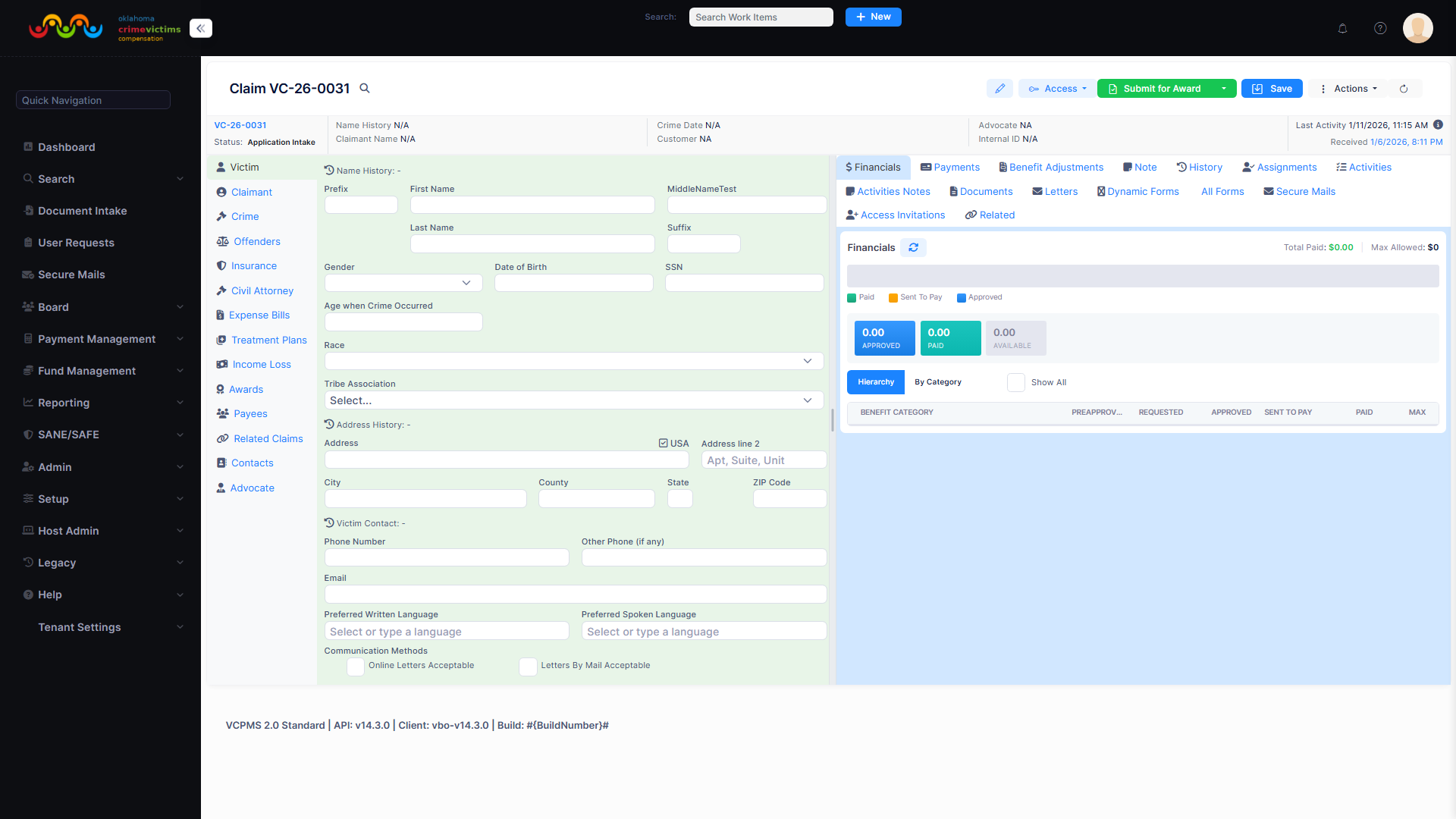
VC Claim detail view — Advocates see similar claim information with read-only access through VCPAdvocate
5. Document Submissions
One of the most powerful features of VCPAdvocate is the ability for advocates to submit documents on behalf of their clients. This reduces the burden on victims and accelerates the claims process by allowing advocates to gather and upload supporting materials directly.
Submitting Documents on Behalf of Clients
Advocates can upload a wide variety of documents to support their clients' claims, including:
- Police reports — Official incident reports and case documentation
- Medical records — Treatment records, hospital bills, and medical evaluations
- Receipts and invoices — Expense documentation for reimbursement claims
- Employer statements — Verification letters for income loss claims
- Court documents — Protection orders, legal filings, and court records
- Supporting correspondence — Letters, statements, and additional evidence
Document Upload Workflow
Select Client & Claim
Navigate to the assigned client's claim where the document needs to be attached.
Initiate Document Submission
Start a new document submission, selecting the document type and providing a description.
Upload File(s)
Upload one or more files. The system accepts common document formats including PDF, images, and Office documents.
Submit for Processing
Finalize the submission. Documents are automatically linked to the appropriate claim and queued for staff review.
Claim Application Assistance
In certain implementations, advocates can also help fill out and submit claim applications on behalf of victims. This capability expands access for individuals who may need assistance navigating the application process. Application data submitted through VCPAdvocate flows directly into the staff portal for processing, eliminating duplicate data entry.
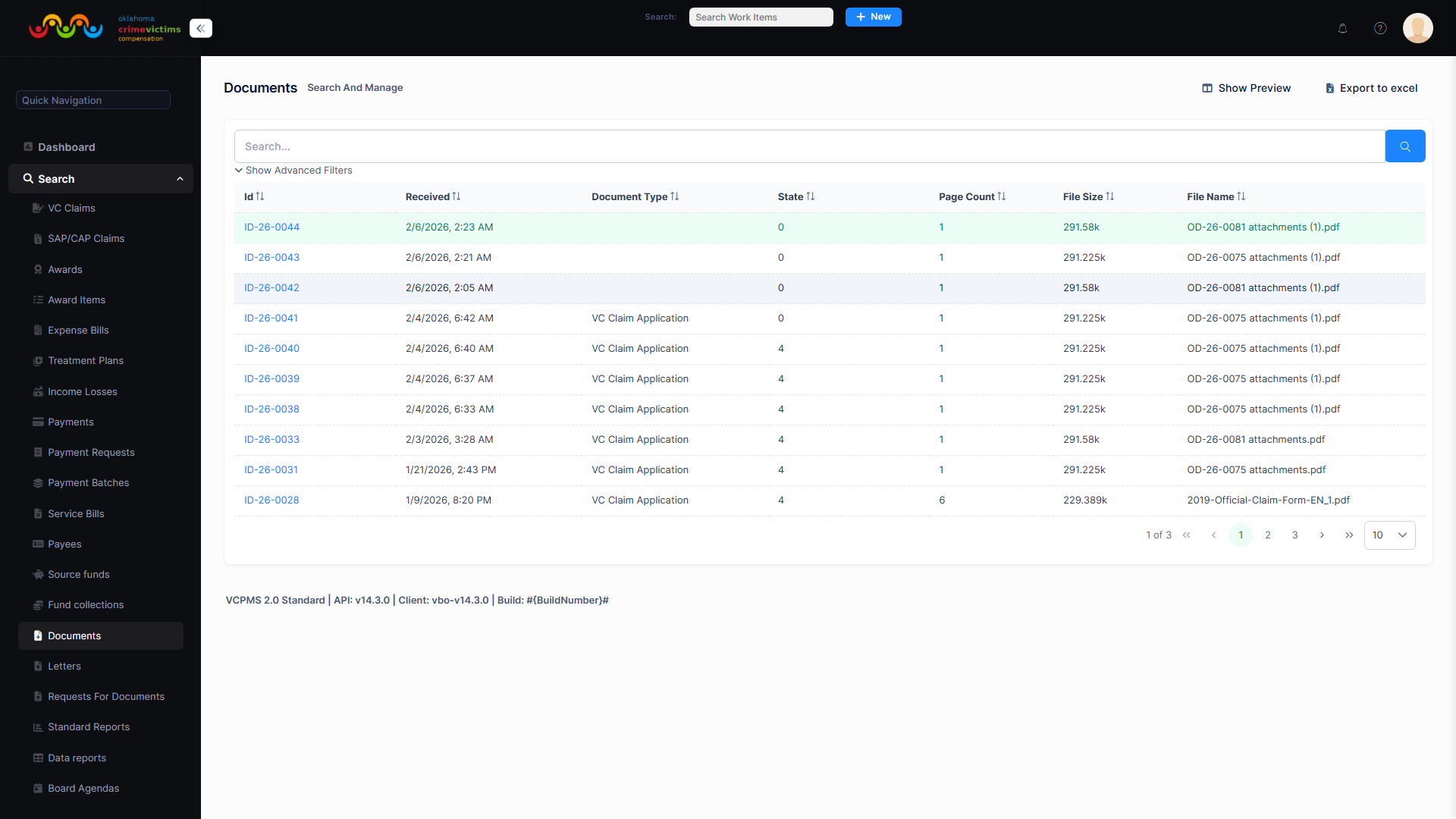
Document management view — Advocates can submit documents on behalf of clients, which are then managed by back-office staff
6. Real-Time Status Reports
VCPAdvocate provides advocates with the ability to generate and view real-time claim status reports. These reports are designed to be immediately useful for court preparation, client meetings, and inter-agency coordination.
Court Preparation Reports
Advocates frequently need accurate, up-to-date claim information when preparing for court hearings, restitution proceedings, or victim impact statements. VCPAdvocate delivers:
Claim Status Summary
A concise overview of the current claim status, key dates, and milestones for quick reference during proceedings.
Payment & Award History
Detailed record of all payments made and awards granted, useful for restitution calculations and court documentation.
Correspondence Log
Complete log of all tracked correspondence, including emails, letters, and portal messages related to the claim.
Correspondence Tracking
The system tracks all correspondence related to claims, including emails and letters. Advocates can review this correspondence to ensure all communication is properly logged and can reference tracked items when needed for court or advocacy purposes. This comprehensive audit trail supports accountability and transparency.
Screenshot: VCPAdvocate real-time status report with claim timeline, payment history, and correspondence log — Available in production environment
7. Communication
Effective communication between advocates and back-office staff is essential for efficient claim processing. VCPAdvocate provides multiple communication channels to keep all parties informed and aligned.
vPostalBox — Secure Messaging
VCPAdvocate includes vPostalBox, a secure messaging system that enables two-way communication between advocates and back-office staff. All messages are encrypted, logged, and linked to the relevant claim record.
| Feature | Description |
|---|---|
| Send Messages | Compose and send secure messages to assigned staff members |
| Receive Messages | Receive messages from staff with notifications via email, SMS, or portal |
| Attachments | Send and receive file attachments within secure messages |
| Claim Linking | All messages are automatically linked to the relevant claim for context |
| Message History | Complete conversation history is preserved and searchable |
Notifications & Alerts
Advocates can configure notifications to receive timely alerts about important events. Notification delivery methods are configurable per advocate:
- Email notifications — Delivered to the advocate's registered email address
- SMS notifications — Text message alerts for time-sensitive updates
- Portal notifications — In-app alerts displayed on the dashboard
Notification Triggers
Advocates receive notifications when:
- A claim status changes (e.g., from Under Review to Approved)
- New documents are attached to an assigned claim
- Staff sends a message through vPostalBox
- An award or payment is processed
- A deadline is approaching for a required action
Two-Way Communication with Staff
Beyond messaging, advocates can request additional information from staff, provide updates on client circumstances, and coordinate actions needed for claim processing. All communication is tracked in the system audit trail, ensuring transparency and accountability.
Screenshot: VCPAdvocate vPostalBox messaging interface with conversation threads and notification preferences — Available in production environment
8. Multi-Case Tracking
Victim advocates often manage multiple clients simultaneously, each with one or more active claims. VCPAdvocate is purpose-built for multi-case management, providing tools that help advocates stay organized and responsive across their full caseload.
Centralized Caseload View
The dashboard provides a comprehensive overview of all assigned claims in a single view. Advocates can sort, filter, and search across their caseload to quickly find specific clients or prioritize claims that need attention.
Caseload Overview
See all assigned claims at a glance with status indicators, last activity dates, and pending action counts for each case.
Search & Filter
Quickly locate specific claims by client name, claim number, status, or date range. Advanced filtering helps manage large caseloads efficiently.
Cross-Case Collaboration
Interact with other users involved in claims, including staff, other advocates, and service providers, for coordinated case management.
Screenshot: VCPAdvocate multi-case tracking view with sortable columns, status filters, and caseload summary — Available in production environment
9. Survey Distribution
VCPAdvocate supports the distribution and collection of surveys sent to victims and claimants. Surveys are an important tool for victim compensation programs to gather feedback about the claims process, measure satisfaction, and identify areas for improvement.
How It Works
Advocates may be involved in facilitating survey distribution to their clients, helping to ensure higher response rates and more complete feedback. The survey process includes:
- Survey delivery — Surveys are distributed through the portal or via email to victims/claimants
- Advocate facilitation — Advocates can assist clients in understanding and completing surveys
- Response collection — Completed surveys are collected through the platform for program analysis
- Confidentiality — Survey responses are handled with the same privacy protections as all other claim data
10. Profile Management
Advocates can manage and update their own profile information directly within VCPAdvocate. Keeping profile details current ensures that communications reach the right person and that organizational records remain accurate.
Profile Features
| Setting | Description |
|---|---|
| Contact Information | Update mailing address, phone number, and email address |
| Organizational Affiliation | Manage association with nonprofit, hospital, or legal organization |
| Communication Preferences | Choose preferred contact methods and language preferences |
| Notification Settings | Configure which events trigger notifications and how they are delivered (email, SMS, portal) |
| Password Management | Change password, manage MFA settings, and review login history |
Screenshot: VCPAdvocate profile management page with contact information and notification preferences — Available in production environment
11. FAQ & Help
Frequently Asked Questions
How do I get access to VCPAdvocate?
Access is provisioned by the victim compensation back-office staff. Contact your state's victim compensation program to request an advocate account. In some implementations, you will receive an email invitation to complete your registration.
Can I edit claim details for my clients?
No. VCPAdvocate provides read-only access to claim information. This protects the integrity of the claim record while ensuring you have full visibility into claim details, awards, payments, and documents. If changes are needed, contact the back-office staff through vPostalBox.
What types of documents can I submit?
You can submit police reports, medical records, receipts, employer statements, court documents, and other supporting materials. Common file formats including PDF, JPEG, PNG, and Office documents are accepted.
Can I access claims for any victim?
No. You can only access claims for clients who have been specifically assigned to you by the back-office staff. In multi-jurisdiction implementations, access may also be restricted to your assigned judicial district.
How do I receive notifications about claim updates?
Configure your notification preferences in your profile settings. You can choose to receive alerts via email, SMS, or portal notifications. Notifications are triggered automatically when claim statuses change, documents are attached, or staff sends you a message.
Is VCPAdvocate accessible on mobile devices?
Yes. VCPAdvocate uses responsive web design that adapts to desktop, tablet, and mobile screens. No separate app installation is required — simply access the portal through any modern web browser.
What accessibility standards does VCPAdvocate meet?
VCPAdvocate is built to WCAG 2.1 AA accessibility compliance standards, ensuring the portal is usable by individuals with disabilities including those using screen readers, keyboard navigation, and other assistive technologies.
12. Benefits of VCPAdvocate
Expanded Victim Access
Empowers advocates to act on behalf of victims who may need help navigating the compensation process, ensuring no one is left behind due to complexity or trauma.
Real-Time Claim Visibility
Provides advocates with instant, always-current access to claim statuses, eliminating phone calls and email inquiries to the compensation office.
Court-Ready Information
Generates real-time status reports with payment and award histories, giving advocates the accurate data they need for court preparation and legal proceedings.
Secure Two-Way Communication
vPostalBox provides encrypted, logged messaging between advocates and staff, replacing unsecured email and ensuring all correspondence is preserved in the claim record.
Reduced Victim Burden
Document submission and claim monitoring capabilities allow advocates to handle administrative tasks, reducing stress on victims during their recovery.
Trauma-Informed Design
By enabling trusted intermediaries to manage claim interactions, VCPAdvocate supports trauma-informed service delivery and keeps victims informed through people they trust.
Multi-Case Efficiency
Centralized caseload management replaces spreadsheets and manual tracking, allowing advocates to serve more clients effectively with less administrative overhead.
Enterprise-Grade Security
SSO integration, multi-factor authentication, role-based access control, AES-256 encryption, and complete audit trails ensure victim data is protected to the highest standards.