
Bulk Document Intake with AI Routing
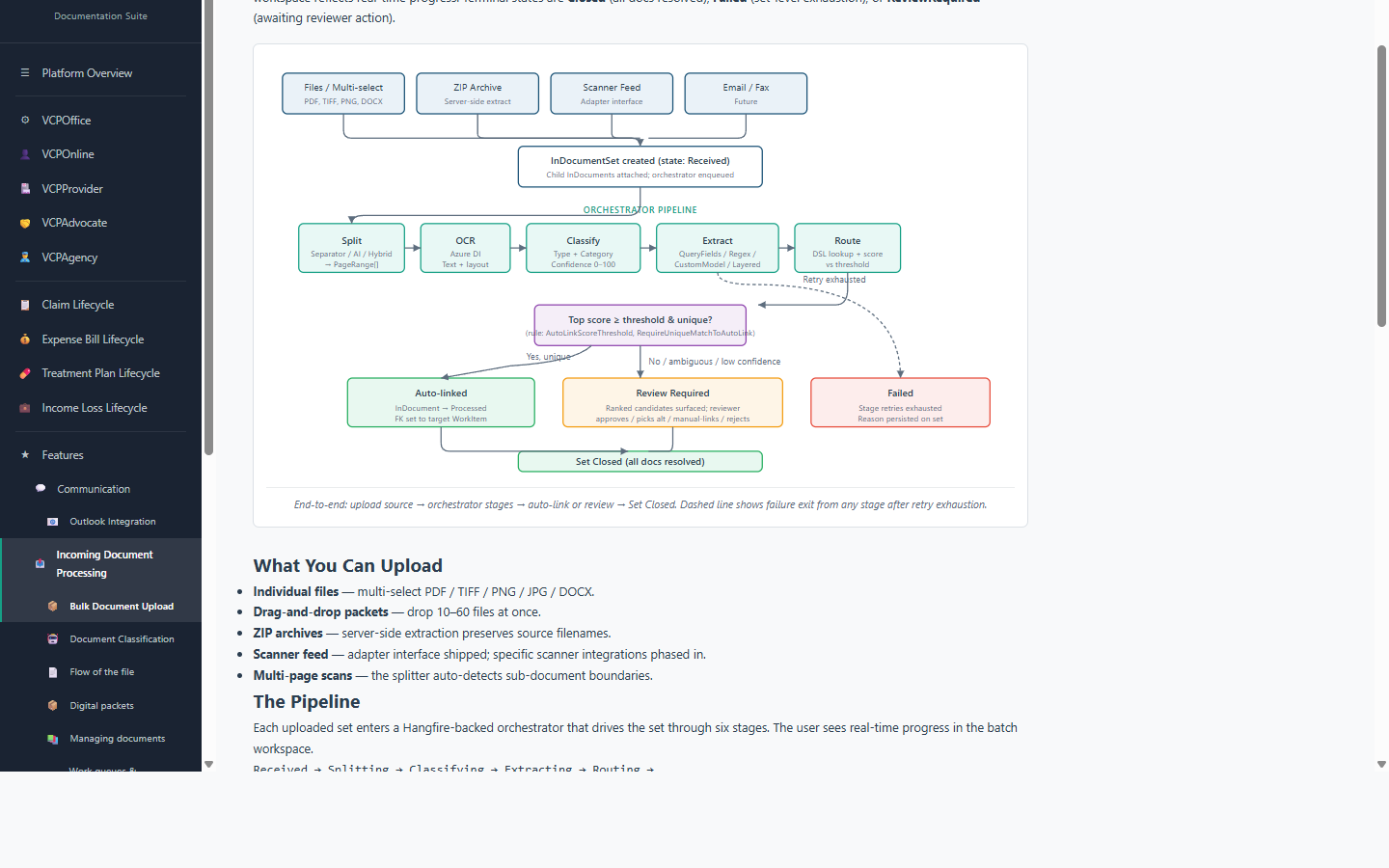
Scan a stack of 120 pages; VCPMS splits it into individual documents, classifies each, extracts fields, and routes to the right claim. Only ambiguous documents reach the human queue.
Key benefits
- · Three splitting strategies — separator-page, AI boundary detection, or hybrid
- · AI classification, extraction, and auto-routing per sub-document
- · Review workspace with focused (one-at-a-time) and overview (all-at-once) layouts
- · Live metrics dashboard — throughput, auto-link rate, confidence distribution
The day-in-the-life this fixes
Mail arrives. It’s a stack of envelopes, each containing one or many documents — some for different claims, some that don’t belong in this program at all. Without bulk intake, a mailroom staffer opens each, guesses the claim it belongs to, and hand-associates it. Mistakes cascade.
What VCPMS does instead
- Drop the scan. The whole stack — as one PDF or a folder — goes into the intake workspace.
- Split. One of three strategies — separator-page detection, AI page-boundary classification, or a hybrid — breaks the stack into sub-documents.
- Classify. Each sub-document gets a type (police report, medical bill, funeral invoice, court order, insurance EOB, ID, …) with a confidence score.
- Extract. Layered extractor chain pulls structured fields (claim number, victim name, date of service, amount) — Azure Document Intelligence query fields first, regex fallback, then custom model.
- Route. Each document scored against the live claim / work-item database (fuzzy matching). High-confidence matches auto-link; low-confidence land in the review queue with a reason.
- Review. Focused (one-at-a-time) or overview (all-at-once) workspace layouts. Approve, reassign, or reject.
- Metrics. Live dashboard shows open sets, auto-link rate, 30-day throughput, time-to-close, review reasons, and confidence distribution.
Why this is unusual
Most programs run document intake as either “dump everything in a queue for humans” or “scan-to-OCR.” Very few have the routing DSL + scoring engine that actually links documents to the right claim automatically — and even fewer expose the resulting metrics as a first-class dashboard.
Configuration
Tenant feature flag App.InDocumentSet.EnableBulkUpload. Routing rules live in in-document-routing-rules.json — programs tune matching behavior without code changes.